Peltier Technical Services, Inc.
 

Excel Chart Add-Ins | Training | Custom Solutions | Charts and Tutorials | Peltier Tech Blog


Peltier Tech
Chart Add-Ins

Peltier Tech Waterfall Chart Utility
Peltier Tech Cluster-Stack Chart Utility
Peltier Tech Box and Whisker Chart Utility
Peltier Tech Marimekko Chart Utility
Peltier Tech Dot Plot Utility
Peltier Tech Cascade Chart Utility


Excel Dashboards


Books at Amazon.com


Horizontal Line Across a Column Chart.

For a newer, more detailed approach, see Add a Horizontal or Vertical Line to a Column or Line Chart or go straight to the new pages:

This page has been retained for compatibility with old links.


Example posted after sufficient encouragement from Debra Dalgleish.

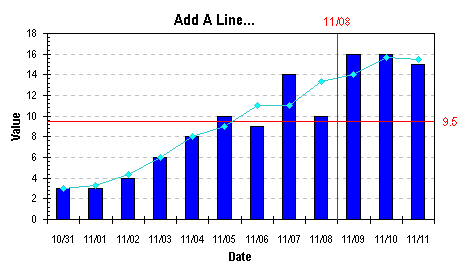
How do you add a nice horizontal line on a column chart, to show a target value, or the series average? The method involves adding a new series, applying it to the secondary axes, and making the secondary axes disappear.

Start with a column chart, like this:

  1. Enter your value in two adjacent cells.
  2. Copy these cells, select the chart.
  3. Paste special to add the new series (by row or column depending on their orientation). So far it's just another set of columns, as shown, but we'll fix that.


  4. Select the new series (which in this example was drawn as another column series).
  5. Go to Chart menu > Chart Type, and select a line without markers.


  6. With the series still selected, go to the Format menu > Format Selected Series > Axis tab, and check Secondary Axes.
  7. Select the chart.
  8. Go to the Chart menu > Chart Options > Axes tab.
  9. Check the secondary X axis.
  10. Uncheck the secondary Y axis.


  11. Select the secondary X axis (at the top of the chart).
  12. Go to Format menu > Format Selected Axis > Scale tab.
  13. Uncheck the Value (Y) Axis crosses between categories.
  14. Then go to the Patterns tab.
  15. Make sure "None" is selected for major and minor axis tick marks and tick labels.


  16. There's your column chart with a horizontal line, just the way you wanted. For a zipped workbook that shows this technique, click here.


Page copy protected against web site content infringement by Copyscape


Peltier Tech Waterfall Chart Utility Peltier Tech Cluster-Stack Chart Utility Peltier Tech Box and Whisker Chart Utility Peltier Tech Marimekko Chart Utility Peltier Tech Dot Plot Utility Peltier Tech Cascade Chart Utility


Create Excel dashboards quickly with Plug-N-Play reports.


Peltier Technical Services, Inc.

Excel Chart Add-Ins | Training | Custom Solutions | Charts and Tutorials | PTS Blog

Peltier Technical Services, Inc., Copyright © 2010. All rights reserved.
You may link to this article or portions of it on your site, but copying is prohibited without permission of Peltier Technical Services.

Microsoft Most Valuable Professional

Microsoft Most Valuable Professional

My MVP Profile