Peltier Technical Services, Inc.
 

Excel Charting Utilities | Custom Solutions | Training | Charts and Tutorials | PTS Blog


Peltier Tech
Chart Utilities

PTS Waterfall Chart Utility
PTS Cluster-Stack Column Chart Utility
PTS Box and Whisker Chart Utility
PTS Marimekko Chart Utility
PTS Dot Plot Utility
PTS Cascade Chart Utility


Excel Dashboards


Books at Amazon.com


Buy me a coffee

If this topic or the whole site has been helpful, please support further development by treating me to a cup of coffee.


Add a Horizontal or Vertical Line to a Column or Line Chart.

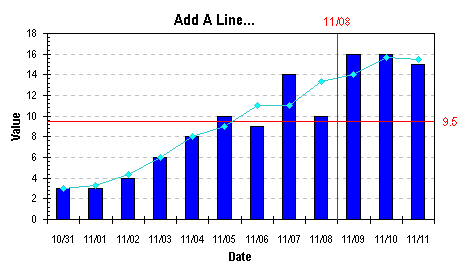
How do you add a horizontal or vertical line to a column or line chart, to show a target value, or the series average? The method involves adding a new series, applying it to the secondary axes, and making the secondary axes disappear. A variation uses an error bar for the straight line, rather than the connecting line between two points.

Add a Horizontal Line to a Column or Line Chart: Series Method.

Add a Vertical Line to a Column or Line Chart: Series Method.

Add a Horizontal Line to a Column or Line Chart: Error Bar Method.

Add a Vertical Line to a Column or Line Chart: Error Bar Method.


Page copy protected against web site content infringement by Copyscape


PTS Waterfall Chart Utility PTS Cluster-Stack Column Chart Utility PTS Box and Whisker Chart Utility PTS Marimekko Chart Utility PTS Dot Plot Utility PTS Cascade Chart Utility


Create Excel dashboards quickly with Plug-N-Play reports.


Peltier Technical Services, Inc.

Commercial Utilities | Custom Solutions | Training | Charts and Tutorials | PTS Blog

Peltier Technical Services, Inc., Copyright © 2010. All rights reserved.
You may link to this article or portions of it on your site, but copying is prohibited without permission of Peltier Technical Services.

Microsoft Most Valuable Professional

Microsoft Most Valuable Professional

My MVP Profile